How can we help you?

Haven't got the manual to hand, misplaced it or lost it?
Then download it here conveniently and easily as a PDF.

Download PDF

Pairs

watch a short video

step by stepĀ 

Have your learners find and match the correct pair. A pair can also consist of text cards as well as picture cards.
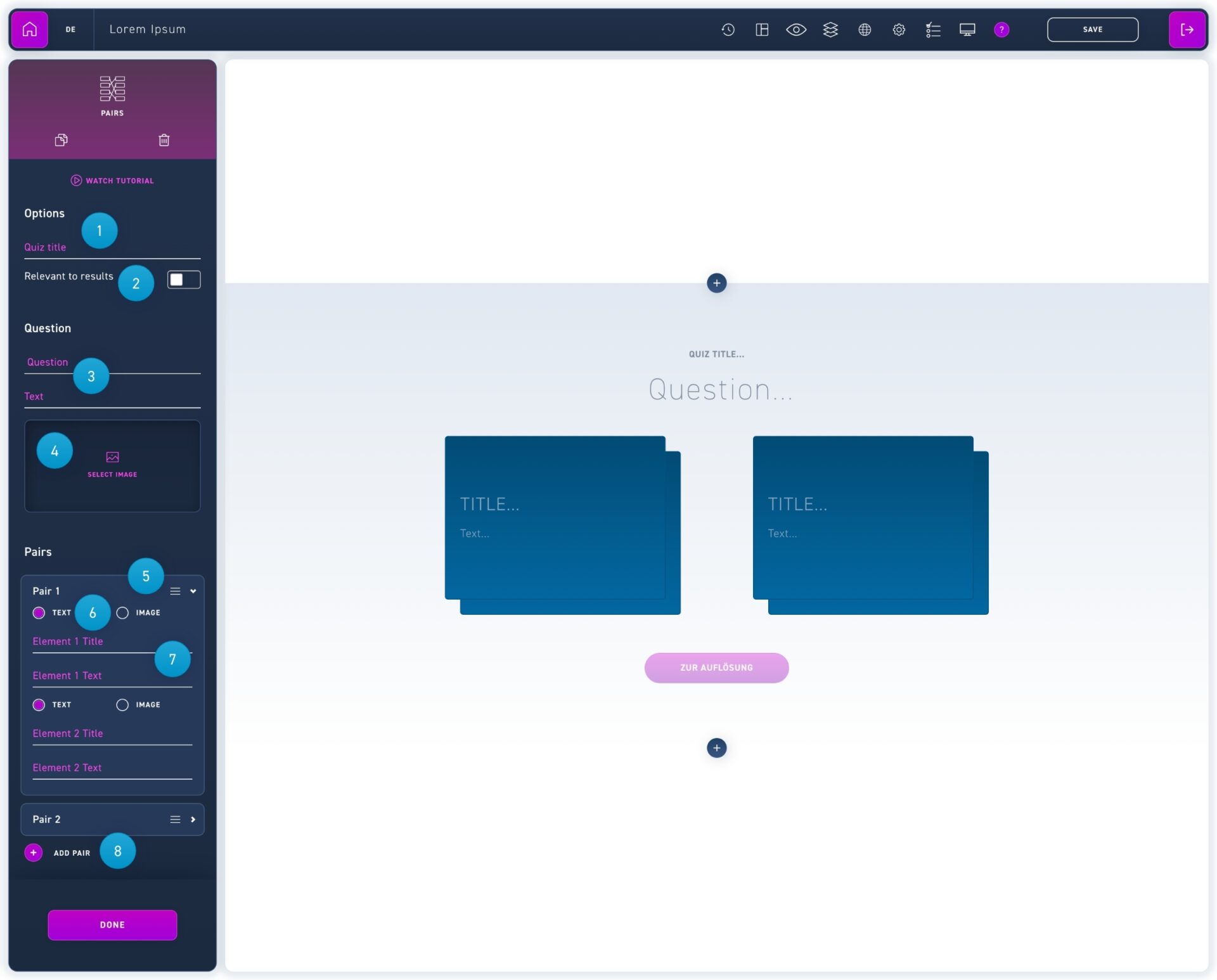
  1. Enter an overall quiz title. This quiz title will be displayed during the WBT evaluation. Choose a unique name by which the quiz can be assigned.
  2. Select whether the quiz is relevant to the result or not. Only quizzes that are relevant to the result will be considered for passing the WBT.
  3. Enter your question and optionally a description text.
  4. Insert an image (this step is optional).
  5. Click on a pair to edit the content.
  6. Choose if the card contains text or a picture.
  7. Enter a caption and/or body text or select an image from the media library (if image was selected in step)
  8. Add more pairs with the add pair button.